Send to an exchange
Sending to an exchange is a normal send with two extra traps: the network, and — for some coins — a memo or destination tag that tells the exchange which account to credit.
1. Get the deposit address from the exchange
On the exchange, open Deposit, choose the coin and the network, and copy the address it shows. Take it from the exchange every time — not from your history and not from an old email.
2. Watch for a memo or destination tag
Some coins share one exchange address across many customers and use an extra number or text to tell them apart:
- XRP — a destination tag
- Cosmos, THORChain, Osmosis and other Cosmos-family chains — a memo
If the exchange’s deposit page shows a memo or tag, it is required. KeepKey Desktop shows a Memo / Destination Tag field in the send form for these chains. Leave it out and the funds usually reach the exchange without being credited to you — recovering them means a support ticket, if it’s possible at all.
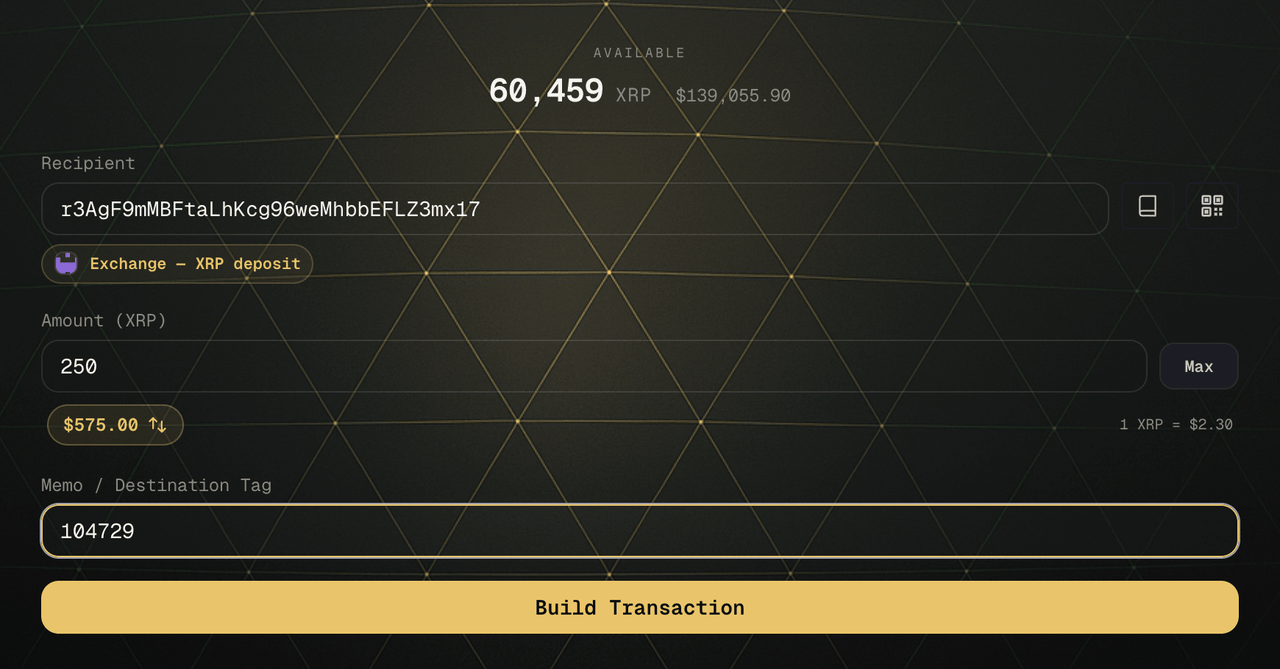
3. Paste it and save it with a label
Paste the address into KeepKey Desktop’s send form. A new address triggers a prompt to save it to your Address Book — save it with a label that says what it is, like “Coinbase — BTC deposit”.
Before saving, do the careful check: compare the pasted address with the exchange’s page in groups of four characters, the whole line. You’re about to trust this entry for future sends (how).
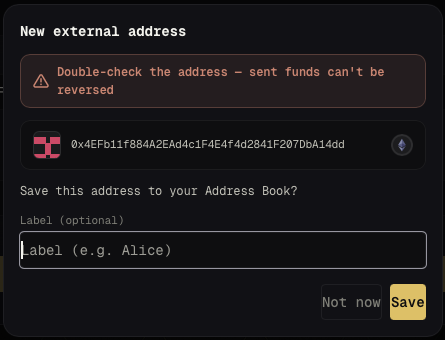
4. Next time: the label is your first check
When you send to a saved address again, KeepKey Desktop shows its label next to the recipient. If you pasted what should be your exchange deposit and no label appears — or you get the “new address” prompt — something changed. Stop and find out why before sending.
Exchanges occasionally change deposit addresses. If the exchange now shows a different one, update the entry after the same careful check; don’t send to the old one out of habit.
5. Build, review, then read the device
Click Build Transaction, check the review, then Sign on Device. On the KeepKey screen, read the whole recipient address and the amount before you press the button. See Verifying Transactions.
6. First deposit? Test it
Send a small amount first and wait until the exchange credits it. Then send the rest.