Clipboard swapping
You copy an address. You paste it. It looks right — same start, same end. But malware on your computer replaced it the moment you pasted, with an address the attacker controls, often chosen to share the first and last few characters with yours.
Clipboard swapping (“clipper” malware) is one of the most common ways people lose crypto, because it needs nothing from you except a normal copy and paste.
What it looks like
- The pasted address starts and ends like the one you copied, but the middle is different.
- The swap happens between copying and pasting — the source (the exchange page, the message) is still correct.
- It can hit either side: the sender’s computer, or the receiver’s when they copy their own address to share it.
The signs in KeepKey Desktop
- No label when you expected one. You pasted your exchange deposit or a saved contact, but the Address Book label doesn’t appear next to the recipient.
- A “new address” prompt you didn’t expect. KeepKey Desktop offers to save addresses it hasn’t seen. If you’re sending to someone you’ve paid before, that prompt is a warning.
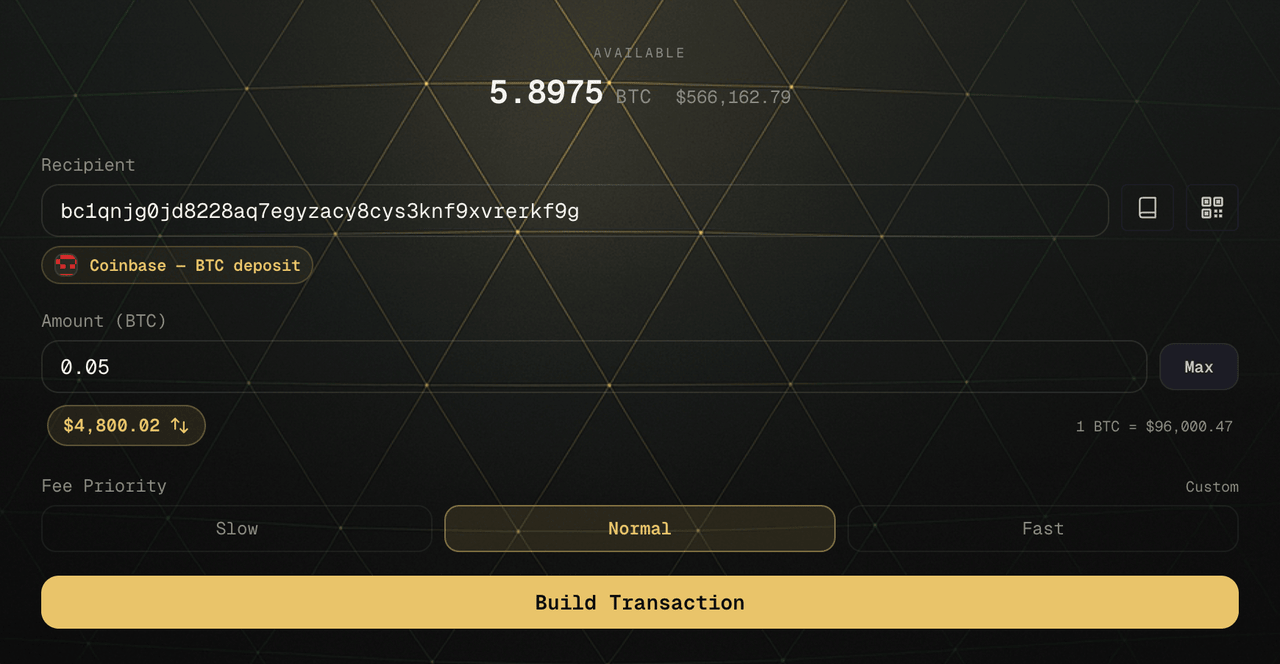
The check that catches it
Read the whole address on the KeepKey screen before you approve, and compare it with the source — the exchange’s deposit page, or the receiver reading from their own device. The KeepKey screen is drawn by the device, not by your computer, so it shows the address that will actually be signed.
Compare in groups of four characters, the whole way through. Checking only the first and last few is exactly what these attacks are built to beat.
If you find one
- Don’t approve on the device. Nothing is signed or sent until you press the button.
- Assume the computer is infected. Don’t use it for crypto until it’s cleaned or rebuilt.
- Your KeepKey’s keys stay on the device; a clipper can’t read them. Stay alert, though — the same malware may try other tricks.
Related
- Address poisoning & dust — the lookalike arrives through your history instead of your clipboard.
- Address Book — labels as a second check.
- Verifying Transactions