Scrambled Recovery Entry
Most wallets recover from a text box, which puts your whole recovery phrase on a general-purpose computer in plain text. KeepKey keeps the real letters on the device screen. Your computer only receives scrambled letters that mean nothing without the device.
1:42 walkthrough. Recorded on the KeepKey emulator (firmware 7.14.1) with a public test phrase. Never enter your real phrase anywhere except your own KeepKey.
How to enter a word
- The KeepKey screen shows the alphabet, a to z, with a different scrambled letter under each one.
- Find the letter you need in the top row of each pair, and read the scrambled letter under it.
- Press that scrambled letter on KeepKey Desktop’s letter keyboard. You can click it or type it.
- Check the device after your first key press. It shows the word so far, such as
1.a---when your word starts witha. If it shows a different letter, you pressed the letter above instead of the one under it. - The scramble changes after every letter, so look at the device before each key press.
- After the first 3–4 letters the device completes the word from the BIP-39 list. Press Next Word (or Space or Enter). On the last word, choose Complete Recovery.
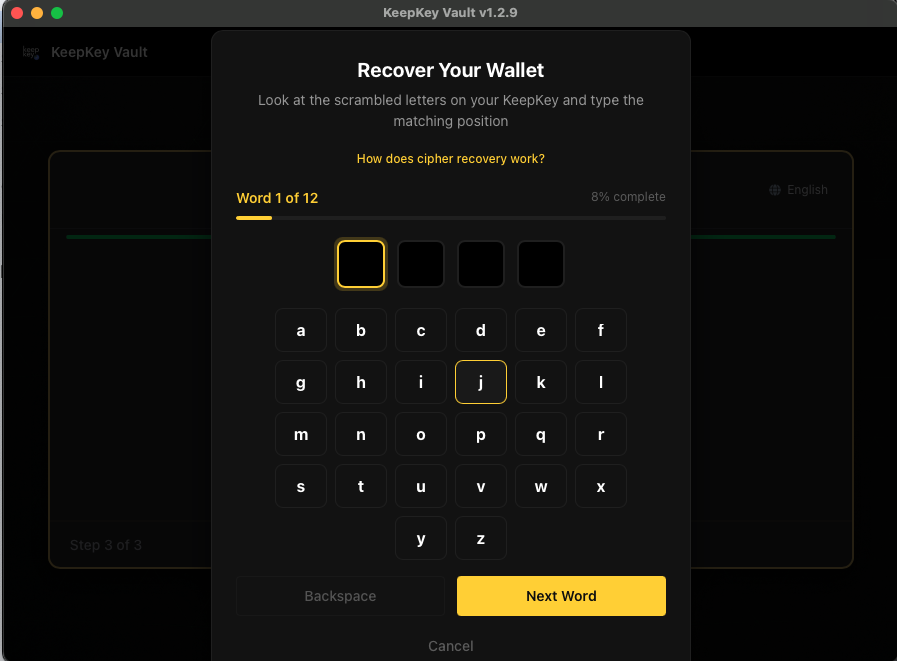
KeepKey Desktop shows only dots for the letters you type. The device screen is the only place to check them.
Before this screen you will already have chosen the word count, which must match your backup (Set Up Your Wallet), and set a PIN. Enter the words in order, exactly as written.
Real words can still fail: the checksum
The last word of a recovery phrase is partly a checksum: a check value worked out from all the other words. A phrase can therefore be made entirely of real BIP-39 words and still be rejected, because one word is wrong or two are swapped.
- A random set of 12 real words passes the checksum only about 1 time in 16. For 24 words it is about 1 in 256.
- When the checksum fails, the device cannot tell you which word is wrong. Every word looked fine on its own.
- So “every word was accepted, then it failed at the end” almost always means a wrong or out-of-order word, not a broken device.
What your firmware checks
| Firmware | A letter group that is not a BIP-39 word | Real words, failed checksum |
|---|---|---|
| 7.10 through 7.14.3 | Caught after the last word, as Incorrect Words Entered | Incorrect Words Entered |
| 7.16 (not yet published) | Caught as soon as you finish that word, as Word Not Recognized. Recovery restarts from word 1 | Incorrect Words Entered |
On 7.10 through 7.14.3, the device also stops after about five words if the letters you pressed spell real words. That means you typed your actual letters instead of the scrambled ones.
Check which firmware you have in KeepKey Desktop under Settings, and the published versions on the release page .
What it protects against
| Attack | What the attacker gets |
|---|---|
| Keylogger or screen recorder | Scrambled letters that change after every key press |
| Compromised desktop app | The same scrambled letters, without the mapping on the device |
| Clipboard sniffing | Nothing. You never copy or paste |
The only way to read your phrase during recovery is to see the device screen, so keep the device out of view of people and cameras.
If recovery fails
- Word Not Recognized (7.16 and later): the letters don’t match a BIP-39 word. Recovery restarts from word 1. Check the device screen before each key press.
- Incorrect Words Entered: on 7.14.3 and earlier this covers every failure: a misread scramble, a word that isn’t on the BIP-39 list, or real words that fail the checksum. First check that your first key press shows your first letter on the device.
- Wrong word count: a 12-word phrase entered as a 24-word recovery will not work. Go back and choose the right count.
When it’s the phrase, the cause is almost always transcription. Common mix-ups are swapped neighbouring words, flat/float, and ambiguous handwriting. Every BIP-39 word is identified by its first four letters, so compare those with the recovery word list. If the connection drops or setup fails, see Creating Your Wallet.
Related
- Set Up Your KeepKey: the full setup flow
- Recovery Phrase: storing your phrase