# Your PIN is Scrambled
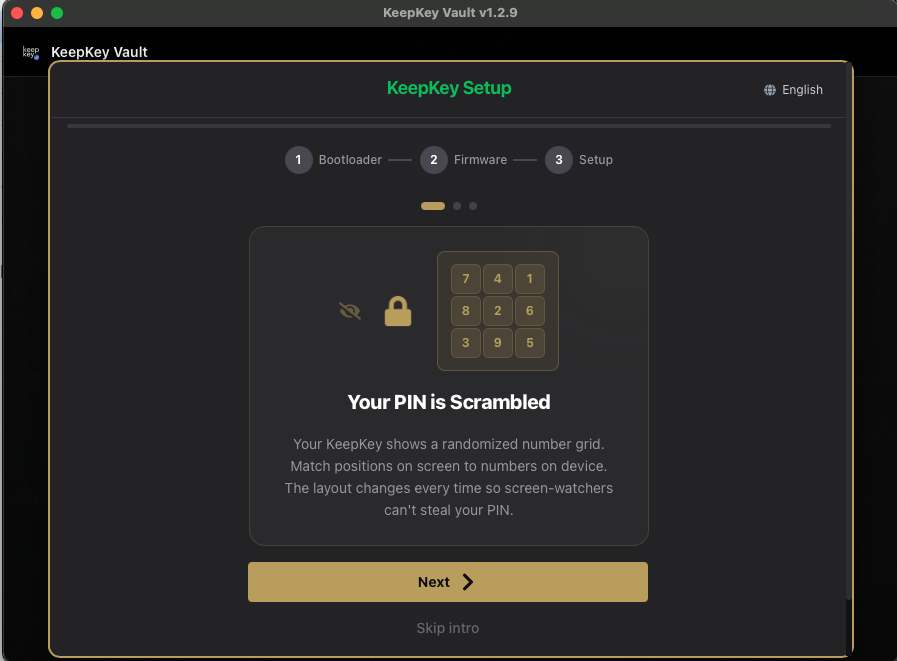
> *"Your KeepKey shows a randomized number grid. Match positions on screen to numbers on device. The layout changes every time so screen-watchers can't steal your PIN."*
>
> — card 1 of 3, shown before setup
 ## What this screen is telling you
Your PIN is never typed into your computer. The digits only ever exist on the KeepKey's own screen. The desktop application shows a **blank 3×3 grid** and records which *positions* you click — it never learns which numbers those positions stood for.
## How it works, concretely
The device screen shows something like:
```
7 4 1
8 2 6
3 9 5
```
Your computer screen shows nine blank buttons in the same 3×3 arrangement. To enter the PIN `1234`:
1. Find `1` on the device — top-right. Click top-right on the computer.
2. Find `2` — center. Click center.
3. Find `3` — bottom-left. Click bottom-left.
4. Find `4` — top-middle. Click top-middle.
## What this screen is telling you
Your PIN is never typed into your computer. The digits only ever exist on the KeepKey's own screen. The desktop application shows a **blank 3×3 grid** and records which *positions* you click — it never learns which numbers those positions stood for.
## How it works, concretely
The device screen shows something like:
```
7 4 1
8 2 6
3 9 5
```
Your computer screen shows nine blank buttons in the same 3×3 arrangement. To enter the PIN `1234`:
1. Find `1` on the device — top-right. Click top-right on the computer.
2. Find `2` — center. Click center.
3. Find `3` — bottom-left. Click bottom-left.
4. Find `4` — top-middle. Click top-middle.
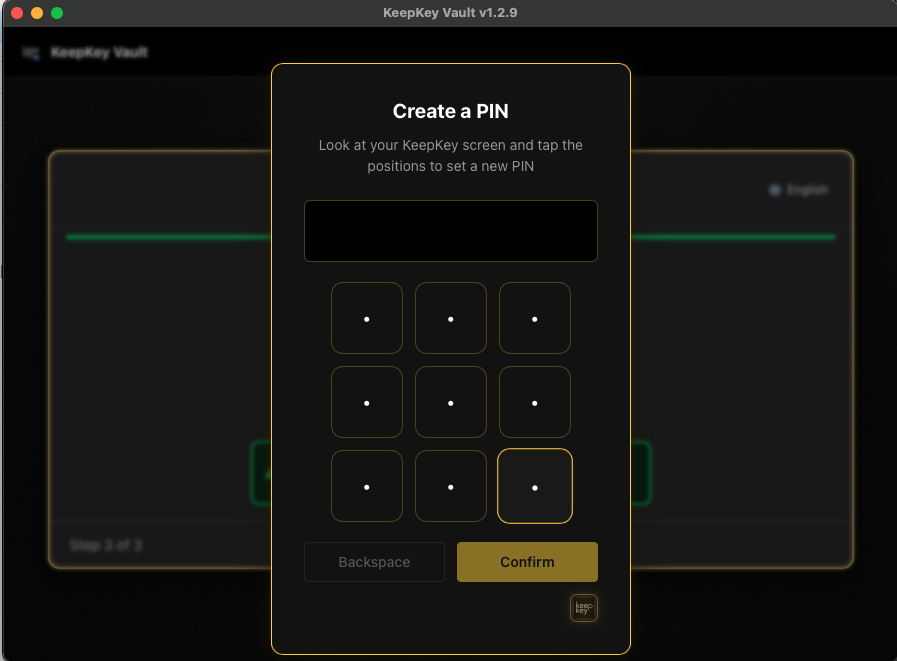 The next time you unlock, the device reshuffles. The same four clicks would spell a completely different number.
## What attack this defeats
| Attack | What the attacker gets |
| --- | --- |
| Shoulder surfing | A sequence of grid positions, valid for one session only |
| Screen recording / screenshot malware | The same — positions with no digits attached |
| Keylogger | Mouse coordinates, not digits |
| Compromised desktop app | Positions. The mapping lives on the device, which the host never reads |
This is the reason KeepKey doesn't ask you to type your PIN into a text box. A PIN typed into a computer is a PIN the computer knows.
## Choosing a PIN
- **4 to 9 digits.** Longer is stronger — but only if you remember it exactly.
- **Not `1234`, not your birth year.** Grid scrambling protects the *entry*, not a guessable PIN.
- **Write it somewhere separate from your recovery phrase**, or memorize it. They should never sit on the same piece of paper.
## If you forget it
The device wipes itself after too many wrong attempts. That is the intended behavior — it's what makes a stolen KeepKey worthless. A wipe is only recoverable from your [recovery phrase](/docs/desktop/setup/recovery-words), which is why the next card in the wizard is about writing those words down.
You can also wipe deliberately from the unlock screen via **Forgot your PIN?**
## Related
- [PIN](/docs/desktop/pin) — changing, removing, and daily use
- [Your Words = Your Wallet](/docs/desktop/setup/recovery-words) — the next card
- [All setup screens](/docs/desktop/setup)
The next time you unlock, the device reshuffles. The same four clicks would spell a completely different number.
## What attack this defeats
| Attack | What the attacker gets |
| --- | --- |
| Shoulder surfing | A sequence of grid positions, valid for one session only |
| Screen recording / screenshot malware | The same — positions with no digits attached |
| Keylogger | Mouse coordinates, not digits |
| Compromised desktop app | Positions. The mapping lives on the device, which the host never reads |
This is the reason KeepKey doesn't ask you to type your PIN into a text box. A PIN typed into a computer is a PIN the computer knows.
## Choosing a PIN
- **4 to 9 digits.** Longer is stronger — but only if you remember it exactly.
- **Not `1234`, not your birth year.** Grid scrambling protects the *entry*, not a guessable PIN.
- **Write it somewhere separate from your recovery phrase**, or memorize it. They should never sit on the same piece of paper.
## If you forget it
The device wipes itself after too many wrong attempts. That is the intended behavior — it's what makes a stolen KeepKey worthless. A wipe is only recoverable from your [recovery phrase](/docs/desktop/setup/recovery-words), which is why the next card in the wizard is about writing those words down.
You can also wipe deliberately from the unlock screen via **Forgot your PIN?**
## Related
- [PIN](/docs/desktop/pin) — changing, removing, and daily use
- [Your Words = Your Wallet](/docs/desktop/setup/recovery-words) — the next card
- [All setup screens](/docs/desktop/setup)